Windows Central Insider





The Surface Laptop Ultra pushes the boundaries of the Surface family. It's the biggest or best in several categories when compared to previous Surface PCs. But the Surface Laptop Ultra is not a device aimed at everyday users. You won't see it fill the lecture halls of universities or the tables of coffee shops (unless you're studying for a very specific degree).
The "normal" Surface Laptop is a premium PC, not an "ultra" PC, so it can't have all the bells and whistles of the Surface Laptop Ultra. But Microsoft can take some elements of the Surface Laptop Ultra to make a better Surface Laptop.
Microsoft can't just shrink the Surface Laptop Ultra and call the new device a Surface Laptop. In fact, smaller laptops often cost more than their larger counterparts. It also would not make sense to just swap the chip to something more affordable to target consumers.

Some features of the Surface Laptop Ultra would be unnecessary in a regular Surface Laptop, such as dual-fan cooling. Others, such as unified memory are up to chipmakers more than Microsoft. Components like RTX Spark and mini-LED would likely make a Surface Laptop too expensive.
Wider port selection

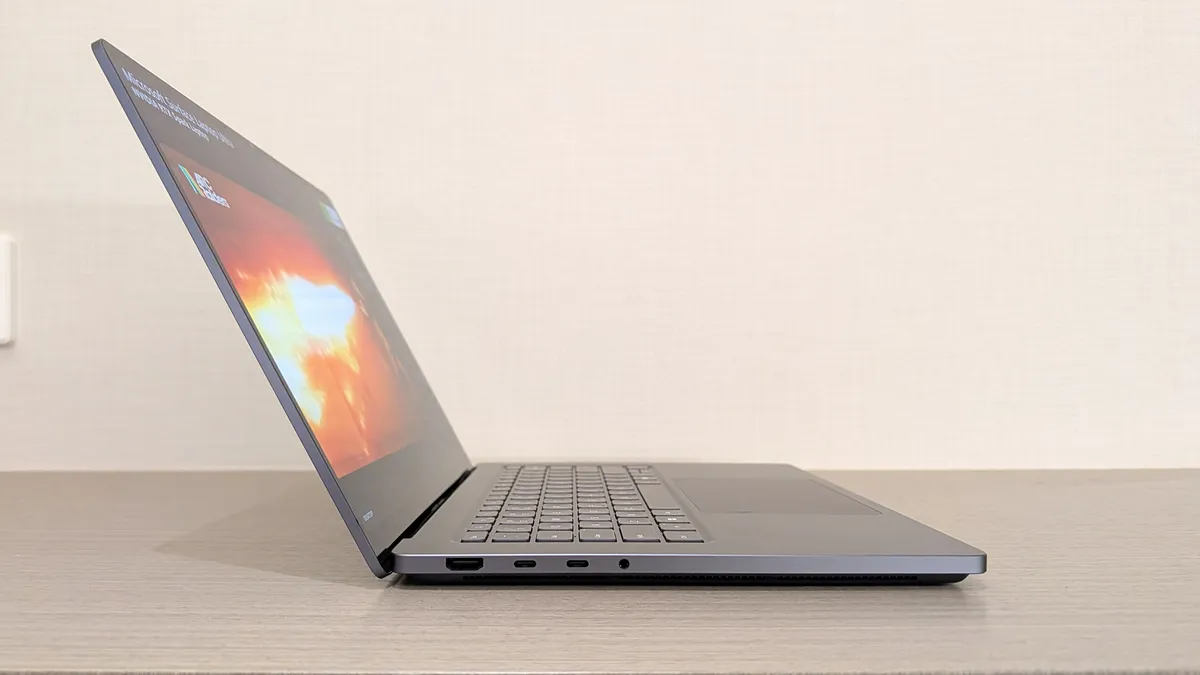
The Surface Laptop Ultra has a plethora of ports. HDMI, USB-C (3x), USB-A, an SD card reader, and a headphone jack are all built in.
In contrast, the Surface Laptop 8 for Business has two USB-C ports (Thunderbolt 4), a USB-A port, a headphone jack, and a Surface Connect port.
A consumer-focused Surface Laptop would fall between the Surface Laptop Ultra and Surface Laptop 8 for Business when it comes to ports.
The wildcard here is the unique USB-C port on the Surface Laptop Ultra. That laptop lacks the Surface Connect Port, at least in the traditional sense.
Microsoft did not confirm details when speaking with our Senior Editor Zac Bowden, but it appears that the USB-C port on the right side of the Surface Laptop Ultra is different than a standard connection.

Here's what Bowden said on that special port:
"Of course, [Microsoft] didn't confirm this to me, but it's clear that the right USB-C port is different for some reason. The company said it would have more to share about specific features of the Surface Laptop Ultra later this year, so we'll have to see. For now, I'm of the belief that this USB-C port features a breakaway design, perhaps even magnetic for easier alignment? Time will tell."
If Microsoft has a new type of Surface Connect Port that's also compatible with traditional USB-C cables, I'd love to see that on a consumer-focused Surface Laptop.
Brighter display

The Surface Laptop Ultra has a 15-inch mini-LED display that can reach 2,000 nits of peak HDR brightness. Our Editor-in-Chief Daniel Rubino was right to use the word "staggering" when referring to the display's brightness.
That level of brightness is not realistic for a consumer device, even a premium one.
The Surface Laptop 8 for Business has a good display that's sharp and has integrated privacy features. It is, however, not as bright as competing laptops. In Rubino's testing, the Surface Laptop 8 for Business hit 500 nits of brightness at 100%.
I'd like to see a Surface Laptop hit between 600-700 nits of brightness. There's a chance that the maximum brightness is connected to the tech needed for the built-in privacy features. Maybe people could pick between higher brightness and privacy.
Larger haptic touchpad

This would only be a small improvement over the already excellent touchpad seen in the Surface Laptop 8 for Business. Rubino shared that "the new advanced haptic touchpad is a joy to use."
Haptic touchpads provide many benefits over diving board style touchpads that can have deadzones and require different pressure at different points.
Microsoft is all-in on haptics. Windows 11 now has new features that let you feel the operating system through subtle tactile cues. For example, dragging a file between folders will result in a small haptic "bump."
Only certain hardware supports the new haptic features. Since Surface PCs are supposed to showcase Windows 11, they should all take advantage of the operating system's haptic capabilities.
The Surface Laptop Ultra has the largest haptic touchpad ever featured on a Surface device. Haptic trackpads are customizable and consistent, so scaling them up is more useful than making a massive traditional trackpad.
Balancing price and features
Microsoft needs to find the middle ground between an Ultra PC and a premium PC. Going overboard with ultra-high-end specs would price out normal consumers and cannibalize the market for the Surface Laptop Ultra. Swinging too far the other way makes the Surface Laptop a poor alternative to premium laptops in the same price range.
To compete with the likes of the Lenovo Yoga Slim 7X and give users the best experience, Microsoft needs to find a middle ground, and it can do that by bringing the more affordable features of the Surface Laptop Ultra to everyday computing.

Join us on Reddit at r/WindowsCentral to share your insights and discuss our latest news, reviews, and more.