





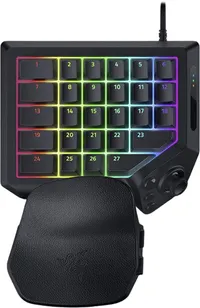
Today, Razer announced the Tartarus V2 Pro, an ergonomic gaming "keypad" with 31 total programmable inputs, priced at $199.99 (and £199.99 in the United Kingdom) at its online store, physical stores, and partner retailers. It follows the first Tartarus Pro, itself a successor to the original — and its own V2 variant — all built for personalization with a particular audience in mind.
To provide a more personalized fit, the Tartarus V2 Pro features an adjustable wrist rest that can be tailored to different hand sizes and desk setups.
Razer
Fans of MMORPGs such as World of Warcraft (and its many variants, like the anticipated WoW Forever) may recognize the Tartarus and possibly its origins in the Nostromo and Orbweaver. Now, the Tartarus V2 Pro features Razer's analog optical key switches with support for accurate, rapid input and adjustable actuation (multiple inputs on a single key), plus a drift-proof TMR thumbstick.
Offering the same Snap Tap and Rapid Trigger tech we saw in its excellent Huntsman V3 Pro keyboard, the Tartarus V2 Pro also appeals as an ergonomic option for competitive FPS players with its 8,000Hz 'HyperPolling' rate and adjustable wrist rest. Either way, gamers can store up to 24 configurable keymaps in the Razer Synapse companion app to match most genres.
Bizarre, niche, and totally fascinating

I've glanced at the Tartarus a few times over the years, intrigued by its weirdness. Then again, most ergonomic hardware looks a little strange at first, but you'll probably only understand what it's trying to do once you use it. Sure enough, Razer offered a sample, and I couldn't resist, so keep your eyes peeled for my Tartarus V2 Pro review coming soon.
Frankly, I also have an ulterior motive for wanting to go hands-on with this unusual keypad. My wife is an avid World of Warcraft enjoyer, but she also suffers from chronic joint pain that led her to use the Xbox Adaptive Joystick for over a year. It certainly impressed, and I share the same praise for that joystick today as I did in my initial Adaptive Joystick review.

However, you'll notice the glaring difference between Microsoft's and Razer's offerings in button count alone. The Tartarus V2 Pro is borderline hilarious in that regard, wrapping 27 keys around your fingertips in a comfortable fashion, with a TMR joystick to boot. In theory, this could be the next step in accessible gaming for her, since she'll barely need to move her hand.
I want it for Counter-Strike 2, but she wants it for WoW. No prizes for guessing which one of us will get more use out of it. Ultimately, I'm craving something more gaming-centric after switching to a low-profile office keyboard and realizing how much that nerfed my experience. The Tartarus V2 Pro might be overkill, or it might be absolutely perfect. I'm excited to find out which.

Join us on Reddit at r/WindowsCentral to share your insights and discuss our latest news, reviews, and more.

